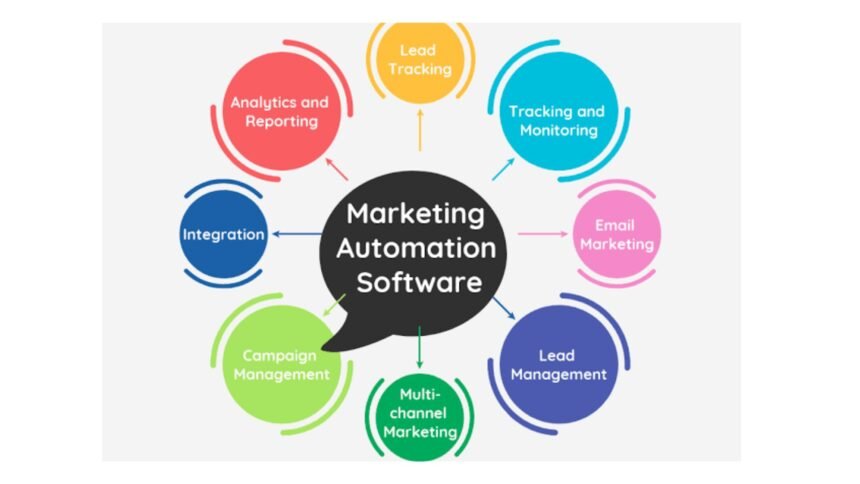
Marketing automation tools help businesses automate repetitive marketing work while coordinating customer interactions across email, websites, CRM systems, mobile channels, and other touchpoints. Instead of manually sending every follow-up or updating every lead record, marketers can build workflows triggered by actions such as form submissions, page visits, purchases, or changes in customer data.
The right platform can reduce manual work, improve lead nurturing, support audience segmentation, and make campaign performance easier to measure. The challenge is choosing software that fits your business rather than paying for a long list of features your team will never use.
What are marketing automation tools?
Marketing automation tools are software applications or platforms that automate defined marketing processes using rules, triggers, customer data, and workflows. Common functions include lead capture, email automation, lead scoring, audience segmentation, campaign management, analytics, and CRM integration.
A simple example is a website visitor submitting a guide-download form. An automated workflow might add the person to an appropriate segment, send a confirmation email, wait several days, deliver related content, and notify sales when the contact reaches a predefined engagement threshold.
Modern platforms increasingly combine automation with AI, customer data, and cross-channel journey management. Salesforce, for example, describes automation capabilities spanning email, web, social, text, lead nurturing, scoring, and campaign measurement.
What can marketing automation tools do?
The capabilities vary considerably by vendor and plan, but most established platforms focus on a core group of functions.
| Capability | What it helps marketers do | Typical use |
|---|---|---|
| Email automation | Send messages from customer actions or conditions | Welcome and nurture sequences |
| Lead management | Capture, segment, score, and route prospects | Sales-ready lead identification |
| Workflow automation | Connect multiple actions into one process | Form submission follow-up |
| CRM integration | Share customer and engagement data | Marketing-sales coordination |
| Analytics | Monitor campaigns and customer activity | Performance and attribution analysis |
| Journey orchestration | Coordinate interactions across channels | Multi-stage customer journeys |
For example, HubSpot’s marketing automation platform supports workflows, forms, email automation, lead scoring, segmentation, and journey orchestration.
Salesforce similarly offers cross-channel journeys, email and mobile marketing, lead generation, scoring, analytics, and CRM-connected automation through its marketing products.
Why businesses use automation
The main advantage is not simply sending emails without human involvement. Good automation connects customer behavior with an appropriate next action.
For a B2B company, that might mean nurturing a prospect who is researching a complex purchase. For an online retailer, it could involve abandoned-cart reminders, post-purchase messages, or re-engagement campaigns.
Automation can also improve operational consistency. A workflow can perform the same defined steps whenever its trigger conditions are met, reducing the need for marketers to remember routine follow-ups manually. HubSpot’s current documentation, for instance, describes workflows that can send emails, create tasks, update records, and trigger notifications automatically.
There are limitations. Automation cannot compensate for poor customer data, irrelevant content, weak segmentation, or badly designed campaigns. An automated message can still be ineffective—and can create a poor customer experience—if its trigger or audience is wrong.
💡 Pro Tip: Start with one high-volume, easy-to-measure workflow, such as a lead welcome sequence. Track delivery, engagement, conversion, and unsubscribes before adding more complicated branches. This makes it easier to identify whether the automation itself is working or whether the underlying offer needs improvement.
How to choose the right platform
Choosing between marketing automation tools should begin with your workflow requirements rather than a feature checklist.
1. Define your primary use case
Decide what you actually need to automate. Email nurturing, lead qualification, customer onboarding, ecommerce retention, event follow-up, and account-based marketing can require different capabilities.
2. Check CRM and data integration
Customer information should move reliably between the systems your teams already use. CRM integration becomes particularly important when marketing engagement influences sales follow-up or lead qualification.
3. Examine workflow flexibility
Look for triggers, conditions, branching logic, scheduling, segmentation, and actions that match your processes. A visually attractive builder is less useful if your team cannot create the workflows it needs.
4. Consider reporting
Useful reporting should connect campaign activity with meaningful business outcomes. Look beyond opens and clicks where possible and determine whether the platform can support the metrics your organization actually uses.
5. Match complexity to team resources
An enterprise platform may offer extensive customization but require more training and administration. A smaller organization may get more practical value from a simpler system that its team can operate consistently.
6. Review scalability and pricing
Compare pricing based on the factors that will grow with your business, such as contacts, emails, users, automation limits, data storage, or advanced features. Do not judge software solely by its entry-level price.
Common mistakes to avoid
A frequent mistake is automating a process before fixing it manually. If the underlying journey contains unnecessary steps or irrelevant messages, automation simply reproduces the problem at greater scale.
Another issue is excessive automation. Customers still need relevant human interaction, particularly for complex purchases, sensitive support situations, and high-value accounts.
Data quality also deserves attention. Duplicate records, outdated fields, inconsistent segmentation, and unclear consent practices can undermine otherwise sophisticated workflows.
Finally, avoid building complicated journeys that nobody regularly reviews. Campaigns, customer behavior, products, and business objectives change. Automation needs maintenance, testing, and periodic performance reviews.
📌 Key Takeaway: The most effective marketing automation tools are not necessarily those with the largest feature lists. Look for a platform that fits your customer journey, integrates with your existing data, supports practical workflows, and gives your team useful performance visibility.
Frequently Asked Questions
What is the difference between CRM and marketing automation?
A CRM generally focuses on managing customer and prospect relationships and associated records, while marketing automation focuses on automating marketing activities such as lead capture, nurturing, segmentation, and campaign workflows. The two systems often work together so marketing and sales teams can use shared customer information.
Are marketing automation tools useful for small businesses?
They can be, particularly when a business has repetitive lead follow-up or customer communication that consumes significant staff time. Small businesses should generally prioritize ease of use, essential integrations, manageable costs, and workflows they can realistically maintain rather than buying unnecessary enterprise-level functionality.
What should I automate first?
Start with a predictable process that has a clear trigger and measurable outcome. Common examples include welcome emails, lead follow-ups, event reminders, customer onboarding, or re-engagement campaigns. A focused first workflow provides a practical way to test data quality and measure results before expanding automation.
Can automation replace a marketing team?
No. Automation handles defined processes, but strategy, creative development, positioning, audience research, campaign planning, interpretation of results, and relationship-building still require human judgment. The purpose is generally to reduce repetitive operational work so marketers can spend more time on higher-value activities.
How much do marketing automation platforms cost?
Pricing varies by provider, plan, contact volume, users, features, and automation limits. Some platforms offer free or entry-level functionality, while advanced capabilities can require paid tiers. Compare the total cost of the features and scale you actually need rather than relying on the lowest advertised starting price.
Choosing marketing automation tools that fit your workflow
The strongest choice depends on what your business needs to automate, how customer data is organized, and how closely marketing must work with sales and service. Start with a specific workflow, establish measurable objectives, verify integrations, and expand only after the first automation proves useful.
With that approach, marketing automation tools become more than email-scheduling software. They can provide a structured way to manage lead nurturing, customer journeys, campaign operations, and follow-up at a scale that manual processes cannot easily support.