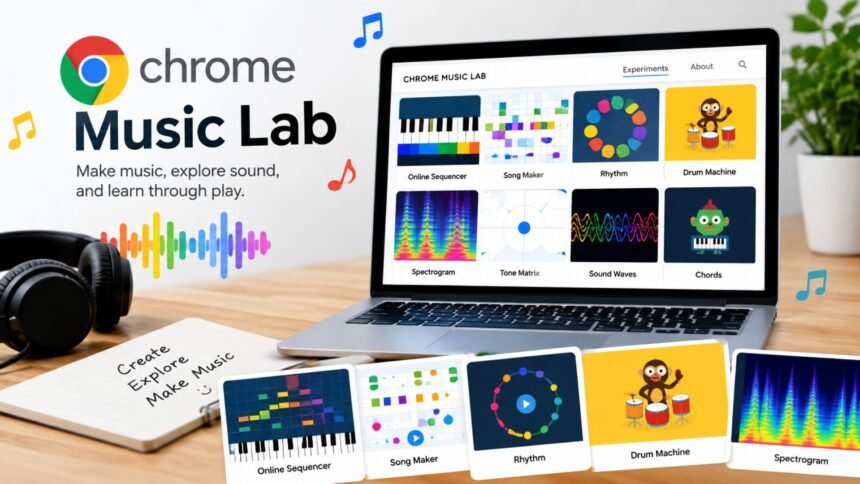
Chrome Music Lab is a browser-based collection of interactive music experiments created by Google Creative Lab. It is designed to make music concepts easier to explore through hands-on activities rather than traditional lessons alone. The platform can be useful for students, teachers, families, beginners, and anyone who wants to experiment with sound without installing specialized software.
One of its biggest advantages is simplicity. You do not need to create an account before using the experiments, and the activities can be opened directly in a web browser. Google says the experiments work across phones, tablets, and laptops.
The platform is also more than a casual music toy. Its experiments can connect music with subjects such as mathematics, science, art, and movement, making it particularly useful in educational settings.
What Is Chrome Music Lab Used For?
Chrome Music Lab gives users an accessible way to investigate fundamental ideas such as rhythm, melody, harmony, tempo, sound waves, and musical patterns. Instead of presenting these ideas only through text, the experiments let users interact with them visually and audibly.
For example, Song Maker lets users build a simple composition by placing notes on a grid. Other experiments explore rhythm, melody, chords, voice, and the visual representation of sound. The official site describes the platform as a way to make music learning more accessible through fun, hands-on experiments.
Teachers can use these activities as short classroom demonstrations, while beginners can use them to understand musical concepts without first learning complex music-production software.
Who Can Use It?
The platform does not require advanced musical knowledge. A student experimenting with rhythm can begin by clicking patterns, while someone interested in composition can create a basic melody.
It can be especially useful for:
- Students learning basic music concepts
- Teachers looking for interactive classroom activities
- Parents introducing children to musical ideas
- Beginners interested in composing
- Musicians wanting a quick browser-based sketching tool
- Anyone curious about the relationship between technology and music
Exploring the Main Experiments
One reason Chrome Music Lab remains approachable is that its activities focus on experimentation. Users can make changes immediately and hear or see the result.
| Experiment or feature | What it helps explore | Useful for |
|---|---|---|
| Song Maker | Melody, rhythm, composition | Beginners and students |
| Rhythm | Beats and rhythmic patterns | Music fundamentals |
| Melody | Notes and melodic patterns | Beginners |
| Chords | Harmony and chord relationships | Music learners |
| Spectrogram | Visual representation of sound | Science and music lessons |
| Voice Spinner | Voice and sound manipulation | Creative exploration |
The exact experience varies by experiment, but the broader idea remains consistent: interact with a musical concept and observe what happens.
Song Maker
Song Maker is one of the most recognizable activities associated with the platform. Google describes it as a simple way to make and share a song.
Users can place notes on a visual grid and build a melody and rhythm. Because the interface is visual, beginners can experiment with musical patterns without needing to understand conventional notation first.
It can also serve as a useful introduction to sequencing. A learner can see how changing the position of notes affects the resulting phrase, then begin thinking about repetition, timing, and structure.
Rhythm and Melody Activities
The rhythm-focused experiments provide a practical way to explore beats and timing. Instead of simply explaining a time signature or rhythmic pattern, the user can interact with the pattern directly.
Melody activities work similarly. Moving between notes helps demonstrate that melodies are sequences of pitches organized across time. These simple interactions can make abstract musical ideas easier to understand.
💡 Pro Tip:
If you are using Chrome Music Lab for learning, change only one musical element at a time. Try altering the rhythm while keeping the melody unchanged, then reverse the experiment. This makes it easier to hear exactly what each change does.
Why Chrome Music Lab Works Well for Beginners
A major strength of Chrome Music Lab is its low barrier to entry. There is no requirement to understand a digital audio workstation, MIDI editing, complex menus, or music-production terminology before starting.
The platform also encourages experimentation. Beginners can make something, listen to it, change it, and try again. That trial-and-error process can be useful when learning because the relationship between an action and its musical result is immediate.
Google says the experiments use accessible web technologies including the Web Audio API, WebMIDI, and Tone.js. Some of the projects also use technologies such as WebGL and WebRTC.
That technical foundation is another interesting part of the platform. Behind the colorful interfaces are browser technologies capable of producing interactive audio experiences.
Chrome Music Lab for Teachers and Classrooms
Educators can use Chrome Music Lab as a starting point for lessons rather than treating it as a complete music curriculum. Google’s education-focused collection specifically highlights it among experiments that teachers, parents, and students have found useful for learning.
A teacher might use a rhythm activity to introduce beats, Song Maker to discuss composition, or a sound-focused experiment to connect music with physics.
It can also support cross-subject learning. Students could investigate patterns mathematically, visualize sound scientifically, create artwork inspired by music, or combine music activities with movement.
The platform therefore fits naturally into short activities, demonstrations, creative assignments, and exploratory projects.
Limitations to Keep in Mind
Chrome Music Lab is intentionally simple, which is also its main limitation. Someone looking for professional recording, detailed mixing, advanced automation, sophisticated effects, or a complete digital audio workstation will need more specialized software.
The platform is better understood as an educational and creative playground than a replacement for professional music-production tools.
Another consideration is that browser-based experiences can depend on the device and browser being used. For classroom use, teachers should test an activity beforehand, particularly when students will be working on different devices.
📌 Key Takeaway:
Chrome Music Lab is most useful when you want an immediate, visual way to experiment with musical ideas. It can introduce composition and sound concepts without requiring an account, installation, or advanced technical knowledge.
Frequently Asked Questions
Is Chrome Music Lab free to use?
Yes. The official Chrome Music Lab site allows users to open its experiments without creating an account. The activities are designed to run through a web browser, making the platform accessible without traditional software installation.
Can you make songs with Chrome Music Lab?
Yes. Song Maker is specifically designed to let users create and share songs. Its grid-based interface makes it possible to arrange notes and rhythms visually, which can be easier for beginners than working with conventional notation or professional production software.
Is Chrome Music Lab useful for school?
It can be useful as an educational activity or supplementary teaching tool. Google highlights its use by teachers, parents, and students and notes that the experiments can help explore connections between music, science, mathematics, art, and other subjects.
Do you need an account to use it?
No. Google states that users can open an experiment and start playing without creating an account. This makes it convenient for quick classroom activities or personal experimentation where setting up individual accounts would be unnecessary.
Can Chrome Music Lab replace professional music software?
No. It is intended for accessible experimentation and learning rather than advanced music production. Professional users who need detailed recording, mixing, mastering, extensive virtual instruments, or complex editing will generally require dedicated music-production software.
Conclusion
Chrome Music Lab turns musical concepts into interactive browser experiences that are easy to explore. Its strength is not professional studio production but accessibility: users can experiment with rhythm, melody, harmony, composition, and sound without first learning complicated software.
For students and teachers, it offers a practical way to make music lessons more interactive. For beginners, it provides a simple introduction to creating and understanding music. And for curious users, Chrome Music Lab offers a quick reminder that music technology can be both educational and playful.