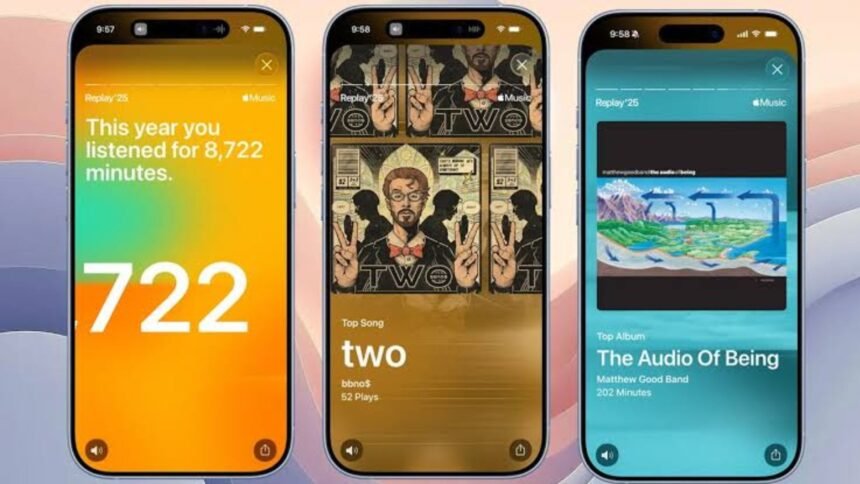
Apple Music Replay gives subscribers a personalized look at the music they have listened to throughout the year. Instead of relying only on a favorite-songs playlist, it uses listening history, play counts, and listening time to create a broader picture of your habits. You can see top songs, artists, albums, genres, playlists, and stations, with insights available across the year and in a year-end recap.
For anyone wondering where to find their Replay, what the statistics mean, or why the feature may not appear, the process is relatively straightforward. Apple provides access through the Music app and a dedicated web experience.
What Is Apple Music Replay?
Apple Music Replay is Apple’s personalized listening-summary feature. It analyzes your Apple Music listening activity and uses factors such as the number of plays and the amount of time spent listening to calculate your top music. The results can include your most-played songs, favorite artists, albums, genres, playlists, and stations.
The experience is not limited to a single year-end playlist. Apple says eligible listeners can view monthly insights, including their leading songs, artists, and albums, as well as listening milestones. At the end of the calendar year, the service provides a broader summary of listening activity.
That makes Replay useful beyond sharing a social-media graphic. It can also help you revisit music you played repeatedly, discover patterns in your listening habits, and find older favorites.
How to Find Apple Music Replay
You can access your Replay from an iPhone, iPad, Android device, Mac, or PC.
On an iPhone or iPad:
- Open the Apple Music app.
- Go to the Home tab.
- Scroll down to Replay: Your Top Music.
- Select the Replay option to view your listening insights.
Apple’s current support instructions also direct users to the dedicated Replay website. Open replay.music.apple.com, sign in with the same Apple Account connected to your Apple Music subscription, and select Jump In.
The web version is particularly useful if you want to view your statistics from a computer or another device without navigating through the Music app.
What Information Does Replay Show?
The exact information available can depend on your eligibility and the current version of Apple’s Replay experience. However, Apple identifies several categories that can appear in your personalized results.
| Replay information | What it tells you |
|---|---|
| Top songs | Tracks you played most frequently |
| Top artists | Artists that dominated your listening activity |
| Top albums | Albums with significant listening activity |
| Top genres | Music categories reflected in your listening |
| Listening time | How much time you spent listening |
| Play counts | How often selected music was played |
| Monthly insights | Your leading music during individual months |
| Milestones | Listening achievements shown by Apple |
Apple also provides a year-end highlight reel containing audio and visual elements based on your listening. Eligible users can share personalized insights, milestones, comparisons, and other results through supported sharing options.
Monthly and Year-End Insights
One useful distinction is that Replay is not simply a December summary. Apple says eligible users can receive insights throughout the year, while the year-end experience presents a wider overview of their listening activity.
This means someone checking Replay during the year may see a different picture from their eventual year-end results. Your listening habits can change substantially as new releases arrive or your favorite artists change.
💡 Pro Tip:
If you want your Replay results to reflect your own listening accurately, check that Use Listening History is enabled on the devices you use for Apple Music. Turning listening history off can prevent played music from influencing Replay and recommendations.
How Does Apple Music Replay Calculate Your Results?
Apple says its Replay calculations use your Apple Music listening history, the number of plays, and the amount of time spent listening to songs, artists, albums, playlists, genres, and stations.
That means the list is not simply based on which songs you remember liking. Your actual listening activity matters.
For example, you might consider one artist your personal favorite but discover that another artist ranks higher because you played their songs more frequently or spent more time listening to their albums.
Your listening behavior can also be affected by shared devices and listening-history settings. If multiple people use the same Apple Music account or device, the resulting recommendations and Replay information may not represent one person’s preferences alone.
Why Can’t I See My Replay?
A missing Replay does not necessarily mean there is a problem with your Apple Music account. Apple says you need to have played enough music to become eligible before Replay becomes available.
If you believe you should have access but cannot find it, check Use Listening History on every device where you listen.
On iPhone or iPad, Apple currently lists the path as:
Settings → Apps → Music → Use Listening History
On Mac, open the Music app, go to Music → Settings → General, and check the listening-history option. Android users can open Apple Music, access Settings, and turn on Use Listening History.
It is also worth making sure your Apple Music app and device software are up to date.
How to Find Older Replay Playlists
Your listening history can extend beyond the current year’s summary. Apple provides access to Replay playlists from previous years, allowing subscribers to revisit earlier listening periods. The current Replay experience also includes an All Time playlist containing songs that have been most played throughout your Apple Music history.
You can add a Replay playlist to your library and share it through supported social platforms. Apple also says the current year’s Replay playlist is updated weekly, so it can change as your listening continues.
This makes older Replay playlists useful for more than nostalgia. They can show how your musical preferences have shifted from one year to another.
How to Share Your Replay
Once you open your Replay insights, Apple provides sharing options for personalized listening information. Depending on the experience available on your device, you may be able to share statistics, milestones, comparisons, or a personalized video from the highlight reel.
You can also share the Replay playlist itself. This is useful when you want friends to see the songs behind your yearly listening summary rather than only seeing individual statistics.
Keep in mind that sharing is optional. Your personalized listening information does not need to be posted publicly simply because it is available to you.
Apple Music Replay vs. a Regular Playlist
A normal Apple Music playlist is something you or another user can deliberately create and organize. Replay is different because it is generated from your listening activity.
That distinction matters when interpreting the results. A playlist may represent songs you intended to listen to, while Replay reflects what Apple records from your listening history. As a result, the two can look quite different.
📌 Key Takeaway
: Replay is best understood as a data-based snapshot of your Apple Music listening habits. Check your listening-history setting, use the official Replay page or Music app, and remember that your results can change as your listening continues.
Frequently Asked Questions
Is Apple Music Replay free?
Replay is a feature connected to Apple Music listening activity rather than a separate standalone subscription. Eligible Apple Music users can access their personalized Replay experience through the Music app or the dedicated Replay website. Availability and specific features can vary by country or region.
When does Apple Music Replay update?
The Replay playlist for the current year is updated weekly, according to Apple. In addition, eligible listeners can receive monthly insights during the year. Your results can therefore change as you continue listening instead of remaining fixed from the beginning of the year.
Can I see my old Apple Music Replay playlists?
Yes. Apple provides access to Replay playlists from previous years, along with an All Time playlist based on your most-played music across your Apple Music history. You can also add Replay playlists to your library so they remain easier to find later.
Why is my Replay not showing my listening correctly?
First, check whether Use Listening History is enabled on all devices you use. Apple states that listening history influences Replay and recommendations. Shared devices or accounts can also affect what appears in your listening profile because activity from those devices may become part of the relevant history.
Can I share my Replay results on social media?
Yes. Apple provides sharing options for personalized Replay insights, including certain statistics, milestones, comparisons, and highlight-reel videos. Replay playlists can also be shared through supported social platforms. The available sharing options can depend on the device and current Apple Music experience.
Conclusion
Apple Music Replay turns your listening history into a personalized record of the songs, artists, albums, genres, and other music you returned to most often. Its monthly insights, year-end statistics, shareable highlights, previous-year playlists, and All Time collection make it useful throughout the year rather than only at the end of December.
If your Replay is missing, start by checking listening-history settings and confirming that you have become eligible. Once everything is working, Apple Music Replay offers a simple way to revisit the music that shaped your listening year.